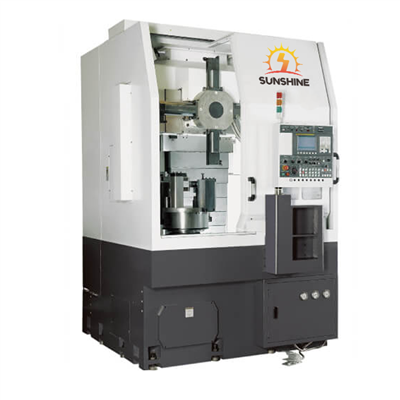
As a supplier of Kitamura Horizontal machines, I understand the importance of properly adjusting the parameters to ensure optimal performance. In this blog post, I'll share some valuable insights on how to adjust the parameters of Kitamura Horizontal machines effectively.
Understanding the Basics of Parameter Adjustment
Before diving into the adjustment process, it's crucial to have a solid understanding of what parameters are and how they affect the machine's operation. Parameters are essentially settings that define the behavior of the machine. They control various aspects such as speed, feed rate, tool path, and more. By adjusting these parameters, you can optimize the machine's performance for different types of workpieces and machining operations.
Pre - adjustment Checks
- Machine Inspection
- Before making any parameter adjustments, thoroughly inspect the Kitamura Horizontal machine. Check for any signs of wear and tear, loose components, or hydraulic/pneumatic leaks. A well - maintained machine is more likely to respond positively to parameter changes.
- Ensure that all safety guards are in place and functioning correctly. This is not only important for the operator's safety but also for the proper operation of the machine.
- Tooling and Workpiece Setup
- Verify that the cutting tools are sharp and properly installed. Dull or incorrectly installed tools can lead to poor machining results and may require different parameter settings than expected.
- Secure the workpiece firmly on the machine table. An unstable workpiece can cause vibrations during machining, which can affect the accuracy of the operation and the effectiveness of parameter adjustments.
Parameter Adjustment Steps
1. Speed and Feed Rate
The speed and feed rate are two of the most critical parameters in machining. The speed refers to the rotational speed of the cutting tool, while the feed rate is the rate at which the tool moves along the workpiece.
- Determine the Material
- Different materials require different speed and feed rate settings. For example, softer materials like aluminum can generally be machined at higher speeds and feed rates compared to harder materials like steel. Refer to the material's technical data sheet or machining handbooks for recommended starting points.
- Initial Settings
- Start with conservative settings. If you're unsure, you can use the default settings provided by Kitamura for a particular material and operation. Then, gradually increase or decrease the speed and feed rate based on the machining results.
- Monitor the cutting forces during machining. If the cutting forces are too high, it may indicate that the feed rate is too high or the speed is too low. Conversely, if the cutting forces are too low, the tool may not be cutting effectively, and you may need to increase the feed rate or speed.
2. Tool Path Parameters
The tool path determines how the cutting tool moves along the workpiece. Adjusting the tool path parameters can improve the machining efficiency and surface finish.


- Step - over and Step - down
- Step - over refers to the distance between adjacent tool paths in the XY plane, while step - down is the distance between successive cuts in the Z - direction. Smaller step - over and step - down values generally result in a better surface finish but may increase the machining time.
- For roughing operations, larger step - over and step - down values can be used to remove material quickly. For finishing operations, reduce these values to achieve a smooth surface finish.
- Lead - in and Lead - out
- Lead - in and lead - out parameters control how the tool enters and exits the workpiece. Proper lead - in and lead - out settings can prevent tool breakage and improve the surface quality at the start and end of the cut.
3. Coolant and Lubrication Parameters
Coolant and lubrication play a vital role in machining. They help to reduce heat, extend tool life, and improve the surface finish.
- Flow Rate
- Adjust the coolant flow rate according to the machining operation and the type of material. Higher flow rates are usually required for high - speed machining or when machining materials that generate a lot of heat.
- Pressure
- The coolant pressure should be sufficient to reach the cutting zone effectively. However, too high a pressure can cause splashing and may not be necessary for all operations.
Using the FANUC System Controls
Many Kitamura Horizontal machines are equipped with FANUC system controls, which offer advanced features for parameter adjustment. The FANUC System Controls The Horizontal Machining Center For Efficient Gear Processing provides detailed information on how these controls work.
- User Interface
- The FANUC system has an intuitive user interface that allows operators to easily access and adjust parameters. You can use the control panel to enter new values, view current settings, and save different parameter sets for future use.
- Automatic Parameter Optimization
- Some FANUC systems offer automatic parameter optimization features. These features analyze the machining process in real - time and adjust the parameters to achieve the best possible results. This can save time and improve the overall efficiency of the machining operation.
Case Studies
Let's take a look at a couple of case studies to illustrate the importance of parameter adjustment.
Case 1: Machining a Complex Aluminum Part
A customer was using a Horizontal Machining Center HMC1814 to machine a complex aluminum part. Initially, the surface finish was not satisfactory, and the machining time was long. By adjusting the speed, feed rate, and tool path parameters, we were able to improve the surface finish significantly and reduce the machining time by 30%.
Case 2: High - volume Steel Machining
Another customer was performing high - volume steel machining on an Automated High - performance Horizontal Machining Center. The tool life was short, and the cutting forces were high. After adjusting the coolant flow rate, pressure, and speed/feed rate, the tool life increased by 50%, and the cutting forces were reduced, resulting in more stable machining and lower production costs.
Conclusion
Adjusting the parameters of Kitamura Horizontal machines is a crucial process that can significantly impact the machining performance, quality, and efficiency. By following the steps outlined in this blog post, understanding the role of different parameters, and leveraging the advanced features of the FANUC system controls, you can optimize your machining operations.
If you're interested in learning more about our Kitamura Horizontal machines or need assistance with parameter adjustment, we invite you to contact us for a procurement discussion. Our team of experts is ready to help you find the best solutions for your machining needs.
References
- Machining handbooks for various materials
- Kitamura machine operation manuals
- FANUC system control documentation