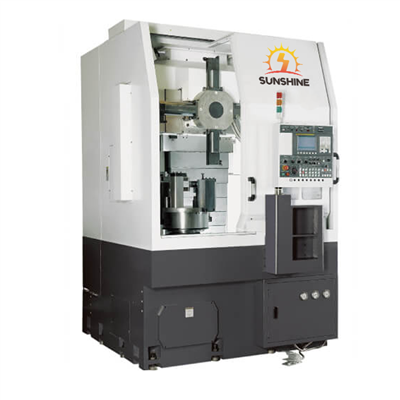
As a supplier of Vertical CNC Machines, I understand the importance of keeping these high - tech pieces of equipment running smoothly. Vertical CNC machines are crucial in modern manufacturing, offering precision and efficiency in various machining tasks. However, like any complex machinery, they can encounter issues from time to time. In this blog, I'll share some effective troubleshooting methods to help you get your Vertical CNC Machine back on track.
1. Electrical System Checks
The electrical system is the heart of a Vertical CNC Machine. Problems in this area can lead to a wide range of malfunctions.
Power Supply
First, check the main power supply. Ensure that the machine is properly connected to a stable power source. Fluctuations in voltage can cause the machine to behave erratically or even shut down unexpectedly. You can use a multimeter to measure the voltage at the power input of the machine. If the voltage is outside the recommended range, consider using a voltage stabilizer.
Next, inspect the power cables for any signs of damage, such as fraying or cuts. Damaged cables can cause short - circuits or intermittent power supply problems. Replace any damaged cables immediately.
Control Panel
The control panel is where you interact with the machine. If you're experiencing issues like unresponsive buttons or incorrect display, start by checking the connections between the control panel and the machine's main control unit. Loose connections can disrupt the communication between the two.
Also, look for any signs of physical damage on the control panel. If a button is stuck or broken, it may need to be replaced. In some cases, software glitches can also cause control panel problems. Try restarting the machine and see if the issue persists. If it does, consult the machine's user manual for instructions on resetting the control panel software.
2. Mechanical Component Inspection
The mechanical components of a Vertical CNC Machine play a vital role in its operation. Any problems with these parts can affect the accuracy and performance of the machine.
Spindle
The spindle is responsible for rotating the cutting tool. If you notice abnormal noises or vibrations coming from the spindle, it could indicate a problem. Check the spindle bearings for wear and tear. Worn - out bearings can cause excessive play in the spindle, leading to inaccurate machining.
Inspect the spindle belt for proper tension. A loose or worn - out belt can slip, causing inconsistent spindle speed. Adjust the belt tension according to the manufacturer's specifications or replace the belt if necessary.


Linear Guides and Ball Screws
Linear guides and ball screws are used to move the machine's axes. Over time, they can accumulate dirt and debris, which can cause uneven movement or jamming. Clean the linear guides and ball screws regularly using a suitable cleaning agent.
Check for any signs of damage or wear on the linear guides and ball screws. If the guides are scratched or the ball screws are pitted, they may need to be replaced. Also, ensure that the lubrication of these components is adequate. Insufficient lubrication can increase friction and reduce the lifespan of the parts.
3. Tooling and Workpiece Considerations
Problems with the cutting tools or the workpiece can also lead to issues with the Vertical CNC Machine.
Tool Selection and Installation
Using the wrong cutting tool for a particular job can cause poor machining results, excessive wear on the tool, and even damage to the machine. Make sure you select the appropriate tool based on the material of the workpiece, the machining operation, and the machine's capabilities.
When installing the tool, ensure that it is properly seated in the tool holder. A loose tool can cause vibrations, inaccurate cuts, and potential safety hazards. Follow the manufacturer's instructions for tool installation and tightening.
Workpiece Fixturing
The way the workpiece is fixed on the machine's table can affect the machining accuracy. If the workpiece is not properly fixtured, it can move during the machining process, resulting in inconsistent cuts. Check the clamps and fixtures to ensure that they are holding the workpiece firmly.
Inspect the surface of the workpiece for any irregularities or contaminants. A dirty or uneven workpiece surface can cause the cutting tool to skip or chatter, leading to poor surface finish. Clean the workpiece surface before machining and make any necessary adjustments to the fixturing.
4. Software and Programming Issues
The software and programming of the Vertical CNC Machine are essential for its proper operation.
Software Compatibility
Ensure that the computer - aided manufacturing (CAM) software you're using is compatible with the machine's control system. Incompatible software can cause errors during the programming and execution of machining operations. Check the software version requirements specified by the machine manufacturer and update the software if necessary.
Programming Errors
Mistakes in the CNC program can lead to incorrect machining results or even machine crashes. Double - check the program code for any syntax errors, incorrect tool paths, or improper feed and speed settings. Use simulation software to preview the machining process before running the program on the actual machine.
If you're still experiencing issues with the program, try running a simple test program to isolate the problem. This can help you determine whether the issue is with the program itself or with the machine's control system.
5. Hydraulic and Pneumatic Systems
Some Vertical CNC Machines are equipped with hydraulic or pneumatic systems to perform certain functions, such as tool changing or clamping.
Hydraulic System
Check the hydraulic fluid level regularly. Low fluid levels can cause the hydraulic system to malfunction, resulting in slow or weak operation of the hydraulic components. If the fluid level is low, add the appropriate hydraulic fluid as specified by the manufacturer.
Inspect the hydraulic hoses for any signs of leakage. Leaking hoses can not only cause a loss of hydraulic pressure but also pose a safety hazard. Replace any damaged hoses immediately.
Pneumatic System
For pneumatic systems, check the air pressure. Ensure that the air compressor is supplying the correct pressure to the machine. Low air pressure can cause the pneumatic components to operate inefficiently or not at all.
Look for any signs of air leaks in the pneumatic hoses and fittings. You can use a soapy water solution to detect leaks. Bubbles forming at a particular point indicate a leak. Tighten the fittings or replace the damaged hoses to fix the leak.
Conclusion
Troubleshooting a Vertical CNC Machine requires a systematic approach. By checking the electrical system, mechanical components, tooling, software, and hydraulic/pneumatic systems, you can identify and resolve most common issues.
If you're in the market for a high - quality Vertical CNC Machine, we offer a range of advanced models, including the CNC milling machine for processing complex parts, the Hardware Mold Precision High - speed Machining Center, and the Mold Processing Equipment VMC1160 Vertical Machining Center. Our machines are designed to provide precision, efficiency, and reliability in your manufacturing processes.
If you have any questions about our products or need assistance with troubleshooting your existing Vertical CNC Machine, don't hesitate to contact us for a procurement consultation. We are committed to providing you with the best solutions for your machining needs.
References
- Manufacturer's user manuals for Vertical CNC Machines.
- Industry standards and best practices for CNC machine maintenance and troubleshooting.
- Technical literature on electrical, mechanical, and software systems in CNC machines.