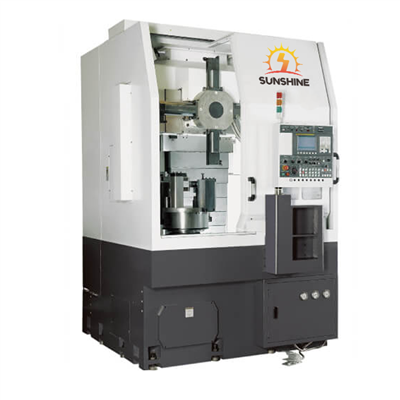
Programming a horizontal CNC (Computer Numerical Control) machine is a crucial skill that can significantly enhance the efficiency and precision of manufacturing processes. As a leading supplier of horizontal CNC machines, I am excited to share valuable insights on how to program these advanced pieces of equipment.
Understanding the Basics of Horizontal CNC Machines
Before delving into the programming process, it's essential to have a solid understanding of what a horizontal CNC machine is and how it operates. A horizontal CNC machine is a type of machining center where the spindle is oriented horizontally. This orientation allows for better chip evacuation and is particularly suitable for machining large and heavy workpieces. Our company offers a variety of horizontal CNC machines, including the Horizontal Machining Center Boring And Milling Machine, which combines boring and milling capabilities for diverse manufacturing needs.
Familiarizing with the Machine's Control System
The first step in programming a horizontal CNC machine is to become familiar with its control system. Most modern horizontal CNC machines are equipped with user - friendly control systems that support G - code programming. G - code is a standard programming language used in CNC machining to control the movement of the machine's axes, spindle speed, and tool changes.
To start, you need to understand the basic G - code commands. For example, G00 is used for rapid positioning, G01 for linear interpolation, G02 for circular interpolation in the clockwise direction, and G03 for circular interpolation in the counter - clockwise direction. Additionally, M - codes are used to control auxiliary functions such as spindle start/stop, coolant on/off, and tool changes.
Creating a Part Program
Once you are familiar with the control system and G - code commands, you can start creating a part program. The part program is a set of instructions that tells the CNC machine how to machine a specific part.


1. Designing the Part
Before programming, you need to have a detailed design of the part to be machined. This design can be created using CAD (Computer - Aided Design) software. The CAD model provides the geometric information of the part, such as dimensions, shapes, and tolerances.
2. Translating the Design into G - code
After obtaining the CAD model, you can use CAM (Computer - Aided Manufacturing) software to translate the design into G - code. CAM software takes the CAD model as input and generates the appropriate G - code based on the machining operations required, such as milling, drilling, or boring.
When using CAM software, you need to define several parameters, including the type of cutting tools, cutting speeds, feed rates, and depth of cuts. These parameters are crucial for achieving the desired machining quality and efficiency.
3. Manual Programming (Optional)
In some cases, especially for simple parts or when making minor adjustments to an existing program, manual programming may be necessary. Manual programming involves writing G - code directly into the machine's control system.
To manually program a horizontal CNC machine, you need to calculate the coordinates of the toolpath based on the part's geometry. For example, if you are machining a rectangular pocket, you need to determine the starting and ending points of each side of the pocket and use G - code commands to move the tool along the desired path.
Setting Up the Machine
After creating the part program, the next step is to set up the machine for machining.
1. Tool Setup
Select the appropriate cutting tools for the machining operations specified in the part program. Mount the tools in the tool magazine or tool holder of the horizontal CNC machine. Make sure the tools are properly installed and tightened to prevent any vibrations or tool breakage during machining.
2. Workpiece Setup
Secure the workpiece on the machine's table using appropriate fixtures, such as vises or clamps. Ensure that the workpiece is accurately positioned and aligned with the machine's axes. You can use alignment tools, such as dial indicators, to achieve precise alignment.
3. Zeroing the Machine
Zeroing the machine involves setting the origin of the coordinate system for the machining operation. This is typically done by using the machine's probing system or by manually setting the zero point on the workpiece. Once the zero point is set, the machine can accurately position the tool relative to the workpiece.
Loading and Running the Program
After setting up the machine, you can load the part program into the machine's control system. Most control systems allow you to load programs from a USB drive, network, or directly from the CAM software.
Before running the program, it's important to perform a dry run to verify the toolpath and ensure that there are no collisions or errors in the program. During the dry run, the machine moves the tool along the programmed path without actually cutting the workpiece.
Once you are satisfied with the dry run, you can start the actual machining process. Monitor the machine closely during machining to ensure that everything is running smoothly. If any issues arise, such as abnormal noises or vibrations, stop the machine immediately and troubleshoot the problem.
Advanced Programming Techniques
In addition to the basic programming steps, there are several advanced programming techniques that can further improve the efficiency and quality of machining on a horizontal CNC machine.
1. Sub - programming
Sub - programming involves creating separate programs for repetitive machining operations. These sub - programs can be called multiple times within the main part program, reducing the amount of code and making the program more organized and easier to maintain.
2. Canned Cycles
Canned cycles are pre - defined G - code routines that simplify the programming of common machining operations, such as drilling, tapping, and boring. By using canned cycles, you can reduce the programming time and ensure consistent machining results.
3. Tool Compensation
Tool compensation allows you to adjust the toolpath based on the actual size and wear of the cutting tools. This ensures that the final part dimensions are within the specified tolerances. There are two types of tool compensation: length compensation and radius compensation.
Our Horizontal CNC Machine Offerings
As a supplier, we offer a wide range of horizontal CNC machines to meet different manufacturing requirements. For instance, the Kitamura Horizontal is known for its high - precision machining capabilities and advanced control system. Another popular model is the Horizontal Machining Center HMC1075, which is designed for heavy - duty machining of large workpieces.
Conclusion
Programming a horizontal CNC machine requires a combination of technical knowledge, practical skills, and experience. By following the steps outlined in this blog, you can effectively program a horizontal CNC machine and achieve high - quality machining results.
If you are interested in purchasing a horizontal CNC machine or need further assistance with programming, we invite you to contact us for a detailed discussion. Our team of experts is ready to provide you with the best solutions for your manufacturing needs.
References
- CNC Machining Handbook
- Introduction to G - code Programming
- CAM Software User Manuals