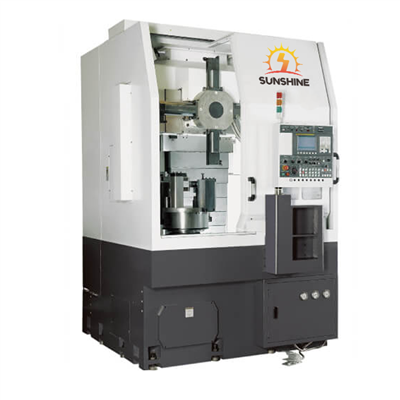
Hey there! As a supplier of the Robodrill 5 Axis, I often get asked about the software required to operate this amazing machine. So, I thought I'd put together a blog post to share all the details.
First off, let's talk about what the Robodrill 5 Axis is. It's a high - tech piece of equipment that offers incredible precision and flexibility in machining. You can check out more about it here: Robodrill 5 Axis. This machine can handle a wide range of jobs, from simple to highly complex machining tasks, and the right software is crucial to make the most of its capabilities.
Computer - Aided Design (CAD) Software
The first type of software you'll need is CAD software. CAD is used to create the 3D models of the parts you want to machine. It allows you to design your parts with precise dimensions and geometries. There are several popular CAD software options out there, and the choice often depends on your specific needs and preferences.
One well - known CAD software is SolidWorks. It's user - friendly and has a large library of pre - designed parts and features. With SolidWorks, you can easily create complex 3D models and then export them in a format that can be used by the subsequent software in the machining process. Another option is AutoCAD. It's been around for a long time and is very powerful for both 2D and 3D design. Many designers and engineers are familiar with AutoCAD, so it might be a good choice if you're already using it in your workflow.
Computer - Aided Manufacturing (CAM) Software
Once you have your 3D model from the CAD software, you'll need CAM software to generate the toolpaths for the Robodrill 5 Axis. CAM software takes the design from the CAD and translates it into instructions that the machine can understand.
Mastercam is a popular CAM software in the machining industry. It offers a wide range of features for generating efficient toolpaths. You can use it to create roughing, finishing, and drilling toolpaths, among others. Mastercam also has good support for multi - axis machining, which is essential for the Robodrill 5 Axis.
Another great option is Fusion 360. It's a cloud - based software that combines CAD and CAM capabilities in one package. This means you can design your parts and generate the toolpaths all in one place. Fusion 360 is also known for its easy - to - use interface and its ability to integrate with other Autodesk products.
Machine Control Software
The Robodrill 5 Axis comes with its own machine control software. This software is what actually controls the movement of the machine. It reads the toolpath data generated by the CAM software and moves the cutting tools and the workpiece accordingly.
The machine control software is designed to be intuitive and easy to use. It allows you to set up the machining parameters, such as spindle speed, feed rate, and tool offsets. You can also monitor the machining process in real - time, making adjustments if necessary. The software also has safety features to prevent any accidents during the machining process.
Simulation Software
Simulation software is another important piece of the puzzle. It allows you to simulate the machining process before actually running the job on the Robodrill 5 Axis. This helps you to identify any potential issues, such as tool collisions or incorrect toolpaths, before they cause problems on the actual machine.
Vericut is a well - known simulation software. It can simulate the entire machining process, including the movement of the cutting tools, the removal of material, and the interaction between the tool and the workpiece. With Vericut, you can visualize the machining process in 3D and make sure everything is working as it should be.
Post - Processing Software
After generating the toolpaths in the CAM software, you'll need post - processing software to convert the toolpath data into a format that the Robodrill 5 Axis can understand. Different machines have different control systems, and the post - processor ensures that the toolpath data is compatible with the specific control system of the Robodrill 5 Axis.
Most CAM software comes with built - in post - processors, but you may need to customize them or use third - party post - processors depending on your requirements. The post - processor takes care of things like converting the units, adding machine - specific codes, and formatting the data correctly.
Why These Software Are Essential
Using the right software is essential for getting the best performance out of the Robodrill 5 Axis. CAD software allows you to create accurate and detailed designs. CAM software generates efficient toolpaths, which can save time and material costs. The machine control software ensures that the machine operates smoothly and safely. Simulation software helps to prevent costly mistakes, and post - processing software makes sure that the machine can read the instructions correctly.


If you're in the market for high - quality machining solutions, you might also be interested in our High - speed Finishing Horizontal Machining Center and Horizontal Machining Center Boring And Milling Machine. These machines, along with the Robodrill 5 Axis, can provide you with a comprehensive machining solution.
Contact Us for More
If you're considering purchasing a Robodrill 5 Axis or have any questions about the software required to operate it, don't hesitate to reach out. We're here to help you make the right choice and ensure that you get the most out of your investment. Whether you're a small - scale workshop or a large manufacturing company, we can provide you with the support and expertise you need.
References
- SolidWorks official documentation
- AutoCAD official website
- Mastercam product information
- Fusion 360 user guides
- Vericut technical resources